article number
215912

Brodit swiveling top support

Price €59.96
Well in stock
-
+
  • Fast Shipping
  • High Quality Products
  • Secure Payments
Details
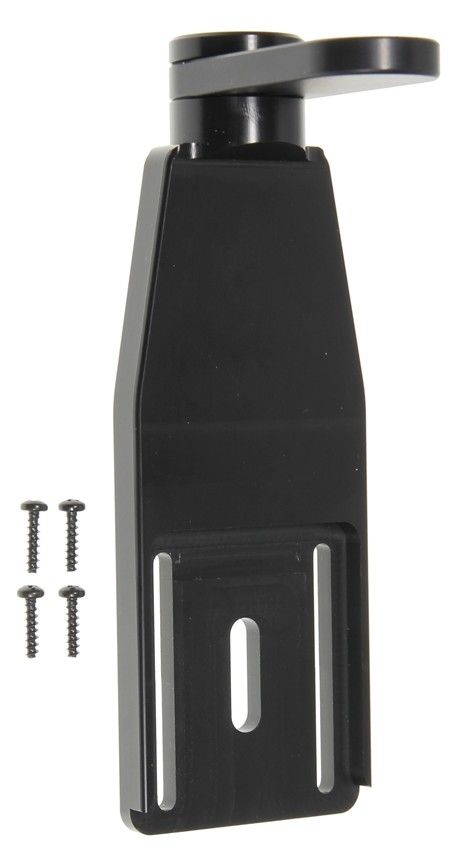
The swiveling top support fits Brodit holders where the plate that attaches the tilt swivel to the holder is 42x50mm. Perfect if you have a holder for a rugged PDA mounted in a rougher environment where it is at risk of falling out.
 
It is easy to attach the top support onto the holder, and adjust the height to fit with your device. To make sure the top support works with your holder and device, measure the distance from the top edge of the tilt swivel to the top of the device when placed in the holder, the top support fits if the distance is between 85 mm to 100 mm.
 
Dimensions: 55 x 157 x 70 mm (W x H x D mm)
Weight: 99 g
More Information
More Information
Accessory brand Brodit
Barcode 7320282159122
Recommended retail price incl. VAT €59.95
Input Voltage does not apply
Voltage (output) does not apply
Max Amperage not applicable
Montage standaard AMPS
Device holder lockable? yes swivel
Color black
Item Returns This item can be returned
Show more + Show less -
Compatibility
Show more + Show less -
Instruction
Please read all of the instructions and look at the pictures before installing.

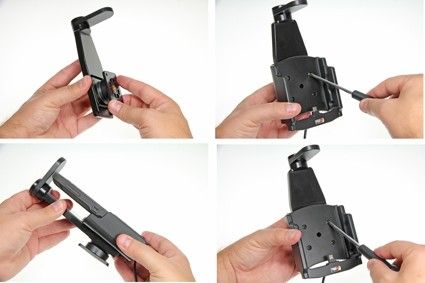
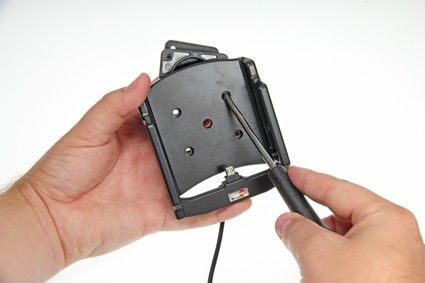
1. Remove the tilt swivel from the back of the holder by loosening the screws in the holder's front.

 
2. Place the tilt swivel into the milled part on the back side of the top support. Place the top support and tilt swivel onto the back of the holder and screw into place using the enclosed screws. Tighten the screws only so that the top support and tilt swivel are held in place but the top support kan still be adjusted. Place the device into the holder and adjust the top support so it fits snugly against the device. Lock the top support into position by tightening the screws further.
 
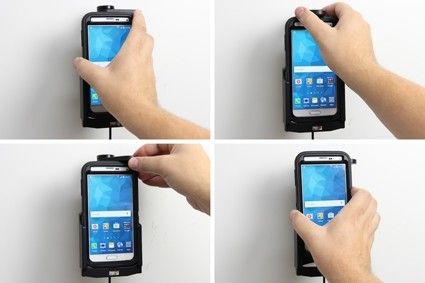
3. To place the device in the holder: Slide the device into the holder from above. Turn the swiveling top support sideways in order to "lock" the device into place in the holder.
To remove the device from the holder: Turn the swiveling top support sideways, in order to set the device free. Lift the device upward and out of the holder.
 
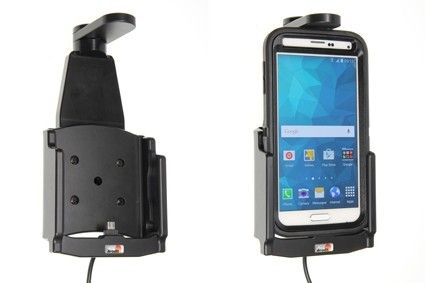
4. The swiveling top support in place in holder.
Scroll to top